Thread Embroidery Editable Text Effect: Craft Fair Review
First Impressions: A Text Effect That Mimics Stitching
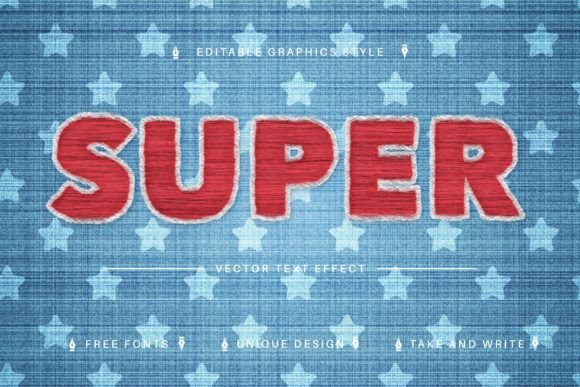
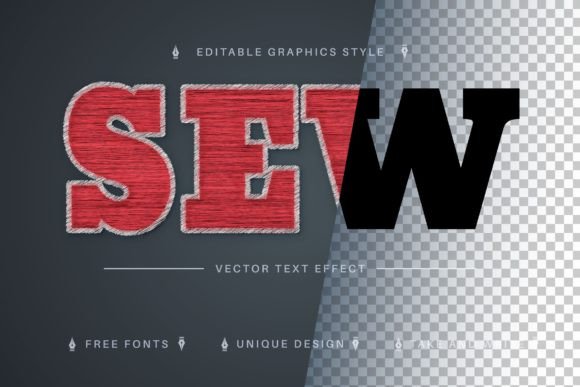
When I opened the Thread Embroidery Editable Text Effect, I immediately saw the soft, raised texture of real thread without a single stitch being sewn. The effect feels both modern and rustic – it could tilt toward farmhouse signage, playful kid’s apparel, or even elegant kitchen linens depending on the font you pair it with. The description says “just write your word and the effect will apply,” and that’s exactly what it does. As a designer who spends hours digitizing, I appreciate anything that lets me test a phrase visually before I fire up the embroidery machine. The layered look of the “thread” has a slight sheen and a subtle shadow that gives it depth, almost like a puffy embroidery finish. It doesn’t look flat or purely digital; it genuinely reads as something stitched.
Because it’s a Layer Styles asset in the Graphics category, I can quickly drop it onto text in my design software and get a near-instant mockup of how a finished embroidered piece might look. This is a huge time-saver for craft fair preparation. I can print a quick sample on cardstock, tape it to a tote bag, and see if the booth display pops. The first test I ran was with a short, playful word in a bold script – the result looked like a premium embroidered patch from ten feet away. That kind of immediate visual punch matters when customers are walking past your table.
Where This Effect Shines on Craft Fair Products
I ran the Thread Embroidery Editable Text Effect through a mental checklist of my best-selling handmade items, and here’s where it truly stands out:
- Tote bags – A single word or short phrase in this effect becomes a focal point. The texture reads beautifully on canvas, and customers can imagine the real embroidery on their shoulder.
- Aprons – For kitchen-themed phrases like “Whisk Taker” or “Sourdough Queen,” the effect adds a cozy, handmade feel that’s perfect for a farmhouse booth.
- Tea towels – I tested a cursive “Home Sweet Home” and the soft, thread-like appearance complements the fabric’s texture. It’s a classic gift item that sells fast at craft fairs.
- Embroidered patches – The effect mimics the slightly raised edge of a patch stitch. If you’re designing mockups for patch sets, this tool will help you sell the concept before you digitize a single stitch.
- Caps – Small, bold text on a cap front can look fantastic, but you’ll need to test legibility. I used the effect on a curved template and it held up better than expected.
- Small pouches and market bags – A delicate monogram or a short funny phrase in this style turns a simple pouch into a giftable, personalized product.
- Pillow covers – A larger, decorative word in the center of a throw pillow cover photographed with this effect immediately signals “cozy, handmade décor.”
What I love most is that the Thread Embroidery Editable Text Effect adapts well to different moods. Pair it with a serif font and it feels elegant and timeless; use a chunky sans-serif and it becomes bold and modern; try a playful script and it’s perfect for baby items or funny kitchen quotes. That versatility means one design asset can serve multiple product lines in your booth.
Production and Selling Insights
From a production standpoint, the most important thing this effect gives me is visual confidence. Before I commit to a 45-minute stitch-out on a towel, I can create a realistic mockup using the effect and place it on a physical product photo. This helps me decide whether the design will sell before I invest in thread, stabilizer, and machine time. For Etsy sellers, it’s a game-changer – you can list a product with a mockup that looks nearly identical to the final embroidered piece, and that builds buyer trust.
I also appreciate that the effect works at different sizes. On a large tote bag, a full phrase can be the hero design. On a small zipper pouch, a single initial or short word still looks crisp and readable. This means I can use the same asset to create a cohesive product line, from large statement pieces to small impulse-buy items. However, I always remind myself that what looks good on screen may not translate perfectly to thread. When I’m ready to digitize, I’ll need to adjust for stitch density and underlay, but the effect gives me a strong starting point.
Watch Out for These Common Pitfalls
Even though the Thread Embroidery Editable Text Effect looks convincing, I have to put on my embroidery designer hat and think about real-world stitching. Here are the careful-use notes I keep in mind:
- Dense stitch areas – The effect often shows a rich, full coverage. In actual embroidery, that can mean heavy stitch density, which may cause puckering on lightweight fabrics. I always test on scrap fabric first.
- Tiny details and small lettering – If the text is under half an inch tall, the effect might still look okay on screen, but real thread will blur those details. I avoid very small text for items like caps or keychains.
- Thick or textured fabrics – The mockup might look stunning on a smooth digital surface, but when I move to a terrycloth tea towel or a canvas tote, the texture fights the stitches. I pick designs with enough open space and use the right stabilizer.
- Curved surfaces – On a cap, the text can warp. I always test the placement on a curved template before finalizing the embroidery file.
- Dark fabric – The effect’s subtle shadows can get lost on dark backgrounds. I plan to use a lighter thread color or add a knock-out underlay for contrast.
- Loss of clarity at smaller sizes – I never assume a design that looks great at 4 inches will work at 1.5 inches. I scale down the mockup first and check if the “thread” texture still reads.
These aren’t flaws of the digital effect itself; they’re just the reality of translating a graphic into actual machine embroidery. The Thread Embroidery Editable Text Effect is a visualization tool, and like any tool, it works best when you know its limits.
How It Boosts Visual Appeal and Buyer Engagement
At a weekend craft fair, your booth has about three seconds to grab someone’s attention. The Thread Embroidery Editable Text Effect helps me create products that feel polished, cohesive, and unmistakably handmade. When I use this effect on printed booth samples, customers immediately recognize the embroidery look. They often reach out to touch the fabric, expecting real thread. That tactile impulse is powerful – it means they’re already emotionally connected to the product.
For online listings, the effect lifts my product photography. A flat text graphic doesn’t convey the same quality as a textured, thread-like design. Shoppers on Etsy or my small shop site see the mockup and instantly understand the value: this isn’t a screen-printed slogan, it’s something that feels premium and crafted. The effect also helps me maintain brand consistency across my entire product line. A single text style ties together everything from aprons to pillow covers, making my booth look deliberate and thoughtful.
Designer Tips for Using the Thread Embroidery Editable Text Effect
As someone who has learned the hard way that a pretty mockup doesn’t guarantee a smooth stitch-out, here are the steps I follow whenever I use this effect for a new product:
- Test on scrap fabric – Before I digitize, I print a paper mockup and pin it to the actual fabric I’ll use. I check how the colors and size interact with the texture.
- Check thread contrast – The effect uses a default color set, but I always swap in my actual thread colors to see if the contrast is strong enough. A pale pink thread on cream fabric might look soft in the effect but disappear in real life.
- Review spacing – The effect can make letters look nicely spaced, but when converted to stitches, some fonts need extra kerning. I open the text in my digitizing software and adjust the letter spacing manually.
- Confirm hoop size – I double-check that the final design fits within my most-used hoop sizes. The effect doesn’t dictate size, so I always measure.
- Inspect stitch density – The effect might suggest a dense fill, but I often reduce the stitch count for lighter fabrics or add a second layer of stabilizer. I’d rather have a soft, wearable design than a stiff, bulletproof patch.
- Create at least one real mockup – I stitch out the design on a real item and set it on my booth table. I watch how customers react. If they pick it up and smile, I know it’s a winner.
- Compare fabric colors – I run the effect on several background colors to simulate different fabric options. A design that looks great on natural linen might get lost on charcoal.
- Confirm commercial licensing – The product description doesn’t spell out the license terms, so I always check with the creator before selling finished products. This is a non-negotiable step for any craft fair seller.
These steps aren’t optional; they’re my routine. The Thread Embroidery Editable Text Effect saves me hours of design trial and error, but it doesn’t replace the real-world testing that makes a product sellable.
Final Verdict for Craft Fair Sellers
If you’re an embroidery business owner, a handmade shop owner, or a digital seller looking to elevate your product line, the Thread Embroidery Editable Text Effect is a smart addition to your design assets. It bridges the gap between a quick idea and a finished product mockup. I can see it becoming a staple in my pre-fair workflow: I’ll brainstorm phrases on Tuesday, mock them up with this effect on Wednesday, stitch out samples on Thursday, and pack my booth on Friday. The result is a table full of products that feel cohesive and high-quality.
Just remember that this is a Graphics asset, not a machine embroidery file. You’ll still need to digitize the actual stitches, choose the right stabilizer, and test for fabric behavior. But for the creative entrepreneur who wants to move fast and test ideas without wasting thread, it’s a tool that pays for itself quickly. I’ll be using it to mock up everything from tote bag designs to printable gift tags, and I’m confident it will help my booth stand out at the next craft fair.